Putting a radio at a remote site
Everything from programming the radio on your bench to hearing it work on the air. Follow it in order — the first half happens at home, and skipping it means a second trip.
Building and installing one gateway: a small computer, a radio interface and a radio, at a site away from your console. Written for the person doing the physical install.
- Your console and hub are already running, and you can sign in.
- You have a site — somewhere with power, a network connection and an antenna.
- You have permission to be there and to leave equipment running.
- You have a second radio you can listen on. You cannot set levels without one.
Part one — at your bench
Do all of this before you go. A gateway that arrives at the site already programmed and already tested is a twenty-minute install. One that doesn't is an afternoon.
-
Program the radio on a laptop
Put the radio on the frequencies, tones and settings it will use at that site, using whatever programming software and cable the radio maker supplies. This is done here, on the bench, before the radio ever goes out.
The gateway does not program the radio and does not change its settings. It keys it and passes audio, nothing more — so whatever you set now is what that site will run.
-
Test the radio on its own
Before it goes anywhere near the gateway, confirm the radio transmits and receives correctly by itself. If the radio is wrong, every problem after this looks like a gateway fault and isn't.
-
Connect the radio to the gateway interface
Wire the interface to the radio, and the interface to the gateway. Power both up on the bench and confirm the gateway keys the radio — you should see the radio go into transmit.
-
Label it
Write the site name on the gateway and on the radio. In six months, when a channel goes quiet, you will want to know which box in which town you are thinking about without opening anything.
- The radio transmits and receives correctly on its own.
- The gateway keys the radio, and the radio unkeys when it stops.
- Everything is labelled with the site it's going to.
Part two — at the site
-
Mount and connect
Antenna to the radio, radio to the interface, interface to the gateway, network cable to the gateway. Power last.
Use a wired network connection if you possibly can. Wireless works, but a gateway on a marginal wireless link produces audio problems that look like radio problems and waste hours.
-
Power it on and wait
Give it a minute or two. The gateway introduces itself to your hub on its own — there is nothing to type in at the site. No keyboard, no screen, no configuration.
-
Find it waiting for you
On your console, the new gateway appears in your gateway list marked PENDING, identified by the hardware it's running on.
Until you approve it, it is inert: it will not carry audio and it cannot key a radio. A gateway that shows up uninvited can do nothing at all until a person says so.
-
Approve it
Approve the pending gateway. This is the moment it becomes part of your system, and it is deliberately a decision you make rather than something that happens automatically.
-
Give its radio a channel
Each radio at the site becomes a channel on your console. Give it a name your operators will read under pressure — the town or the site, not a serial number.
Short and unmistakable beats descriptive. A dispatcher glancing at a screen during a net needs to tell two channels apart in half a second.
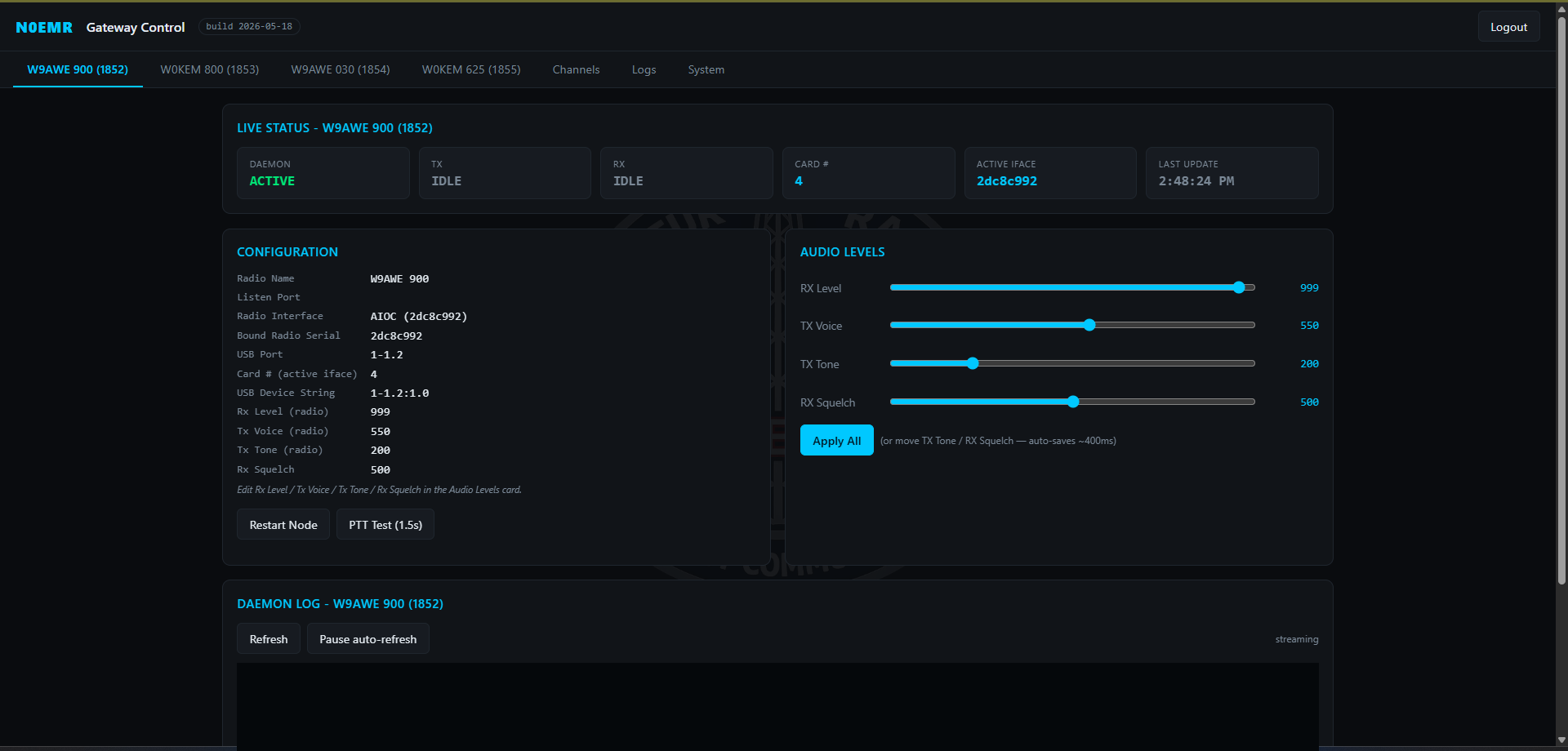
Part three — setting the audio level
This is the part that takes patience, and the part that decides whether people can understand you. It is done by ear, using a second radio — there is no meter that substitutes for listening.
Setting how you sound going out
-
Get somewhere you can hear the site
Have your second radio on the frequency the gateway transmits on, far enough away that you're hearing it over the air rather than through the room.
-
Transmit from the console and talk normally
Key the channel and speak the way you actually speak on the radio — normal voice, normal distance from the microphone. Count, or read something aloud, so you have a steady sound to judge.
-
Listen, and adjust the transmit level for that channel
Change the level a little, transmit again, and listen again. Small changes, one at a time.
What you hear What it means Thin, quiet, hiss around it Too low. You'll be hard to hear on a handheld and worse in a noisy vehicle. Harsh, buzzy, breaking up on louder words Too high. The radio is being overdriven and clipping your speech. Clear and level, like a person on a good radio Right. Stop here. Aim to sound like other stations on that repeater or talkgroup. If you have to strain to understand yourself, so will everyone else.
-
Check it again with a different voice
Have somebody else transmit through the same channel if you can. A level set to one person's voice can be wrong for the next operator.
Setting how the site sounds coming in
-
Transmit into the site from your second radio
Speak into the handheld normally and listen to how it arrives at the console.
-
Judge it the same way
Too quiet and operators will lean in and still miss traffic. Too hot and it distorts on the loud parts. You want incoming audio at roughly the same loudness as your other channels, so an operator isn't reaching for the volume every time traffic moves.
- You transmit from the console and hear yourself clearly on the second radio, at a normal level.
- You transmit into the site and arrive at the console clearly, at about the same volume as other channels.
- The channel shows RECEIVING when traffic comes in, and shows transmit when you key it.
- Nobody on the air asks you to say again.
If it doesn't work
- Check the network first. It's nearly always the network. Confirm the cable is in, the port is live, and the site's internet is actually up.
- Give it longer than you think. Five minutes, not thirty seconds.
- Power it off and on once. If it appeared on your bench and doesn't here, the difference is the site, not the box.
- Confirm you approved it. An unapproved gateway is inert by design and this is the most common cause.
- Check the interface wiring between the gateway and the radio — this worked on your bench, so suspect a cable that moved in the car.
- Confirm the radio is on the right channel and not left in a scan or menu mode.
- Go back to Part three. Almost every intelligibility complaint is a level set too high, not too low.
- Check the radio's own microphone gain setting if it has one — two gain controls fighting each other is a common trap.
- Listen for whether it's distorted (too hot) or buried in noise (too quiet). They sound different and they have opposite fixes.
- Suspect the site's network before anything else, especially on a wireless link.
- Broken-up audio that comes and goes is a network symptom. Audio that's consistently bad is a level or wiring symptom.